


TL;DR: Vibe coding ships three categories of security flaws faster than any human ever could: hardcoded credentials, hallucinated supply chain packages, and insecure code patterns like missing input validation and broken auth. Each one has lightweight, free tooling that catches it before production. Gitleaks and TruffleHog scan for leaked secrets. slopcheck and Socket kill slopsquatting. Security rules files and Semgrep catch the insecure code the AI writes by default. Ten minutes of setup. Three layers of defense.
This is the public feed. Upgrade to see what doesn’t make it out.
The vibe coding pitfalls.
Why Does Vibe Coding Ship Insecure Code by Default?
Vibe coding, the workflow where you describe what you want and an AI builds it, has collapsed the distance between idea and deployed app to roughly one afternoon. Cursor, Replit, Claude Code, Lovable, and a dozen others now let anyone ship production software without writing a line of code by hand. The velocity is real. So are the security holes. Security review is the step that keeps getting skipped because the code looks right and the app works, and “works” and “secure” are different things.
Point any security scanner at a vibe-coded app and the results are predictable: missing XSS defenses, OWASP Top 10 vulnerabilities baked into the default output, critical flaws in apps that passed every functional test. The AI writes code that works. It also writes code that’s wide open.
The reason is mechanical. LLMs optimize for code that runs, not code that’s safe. When an AI hits a runtime error caused by a security check, the fastest fix is often to remove or weaken that check. The pattern shows up constantly in testing: agents disabling authentication flows, relaxing database policies, stripping validation checks, all to make the error go away. The model sees a blocker. It removes the blocker. The blocker was your security.
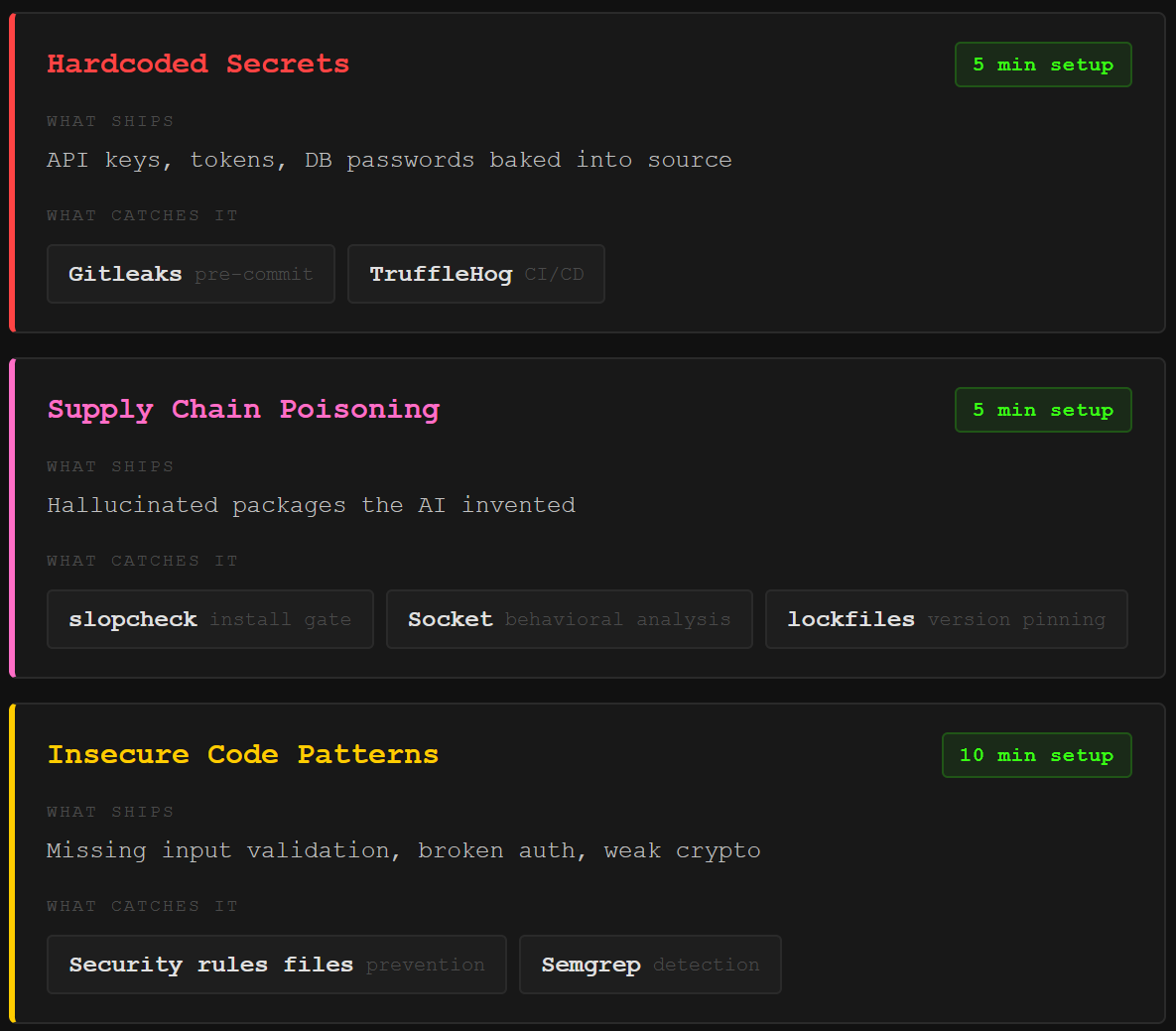
Three categories of flaws ship fastest and hit hardest, and each one has free, lightweight tooling that catches it automatically. Ten minutes of setup per category. The tools do the work while you keep building.
How Do Hardcoded Secrets Leak from AI-Generated Code?
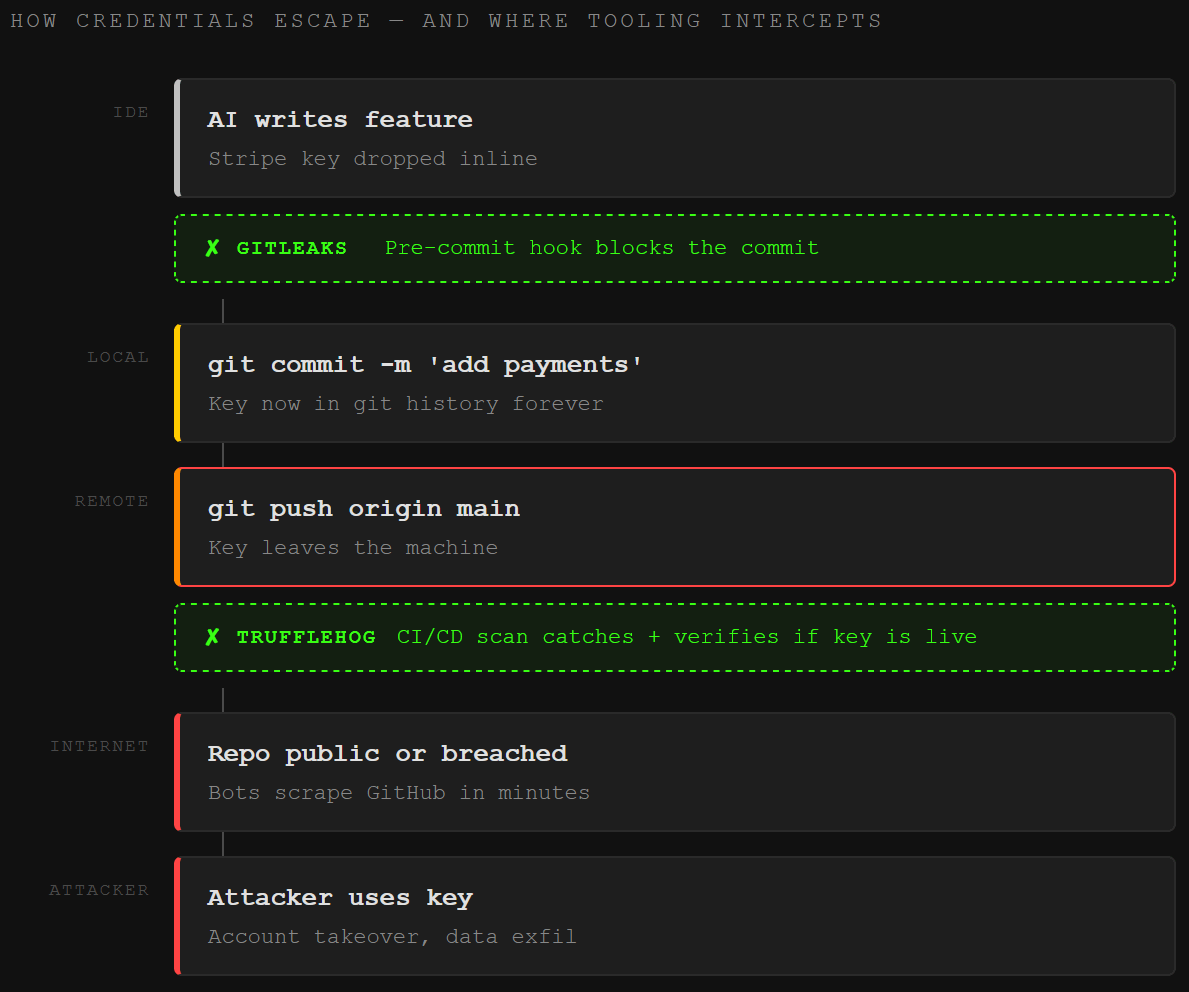
When you vibe code a payment integration or a third-party API connection, the AI needs credentials to make it work. API keys, database passwords, auth tokens. The AI does what gets the feature running fastest: it drops them straight into the source code. Hardcoded, in plain text, committed to version control.
This happens constantly. Open DevTools on a vibe-coded web app and there’s a solid chance you’re staring at a Supabase key, a Stripe token, or a database connection string sitting in the client-side bundle. Moltbook, an AI-built social network, shipped its entire API token store to anyone with a browser. The credentials were right there in the frontend. No exploit required.
Secrets leak from public GitHub repos constantly, and the majority never get rotated. They sit there, active, for years. Combine that with vibe coding’s speed and you get the single easiest initial access vector for attackers. Why crack a password when the API key is already committed to a public repo?
The fix takes five minutes. Two tools, both free, both open source.
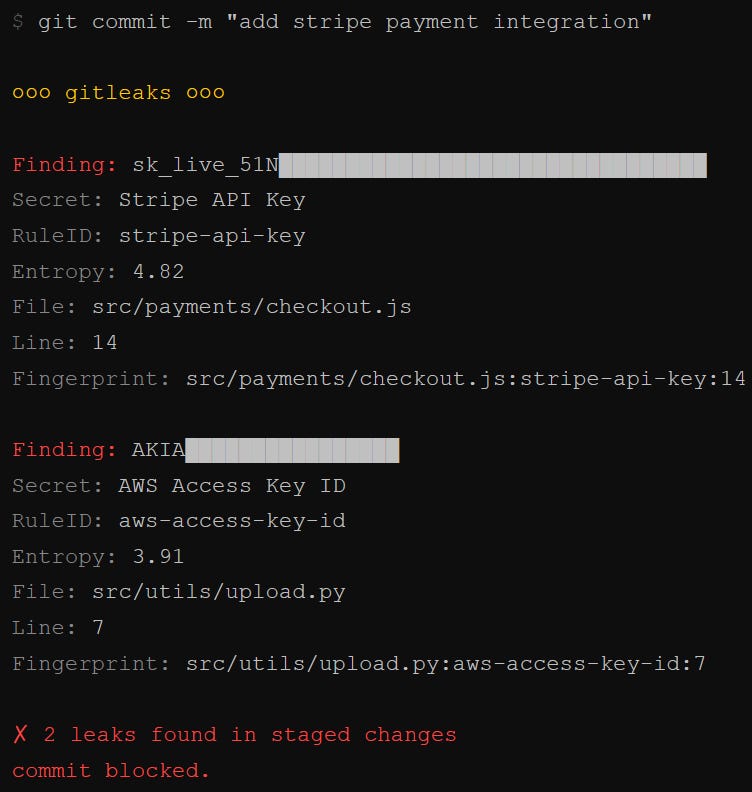
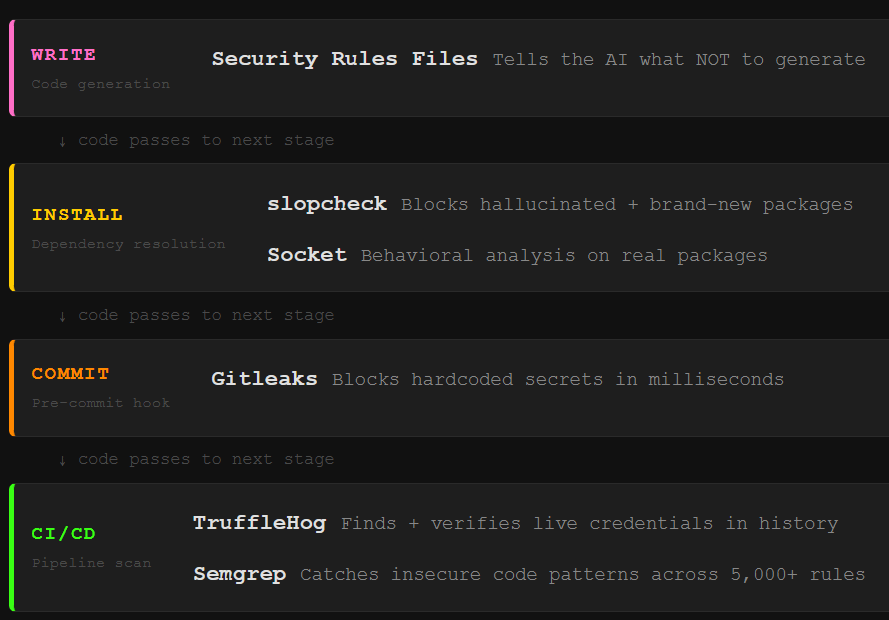
Gitleaks is a lightweight secret scanner that runs as a pre-commit hook, a check that fires automatically every time you try to commit code. It scans for 150+ known credential patterns (AWS keys, GitHub tokens, Slack webhooks, database connection strings) and blocks the commit if it finds one. Install it, add it to your .pre-commit-config.yaml, and hardcoded secrets stop entering your repo entirely. One command: brew install gitleaks on Mac, or pull the Docker image. It runs in milliseconds.
TruffleHog goes deeper. Where Gitleaks catches secrets before they enter the repo, TruffleHog scans your entire git history, plus S3 buckets, Docker images, Slack workspaces, and CI/CD logs. Its killer feature is credential verification: when it finds what looks like an AWS key, it actually tests whether that key is still active. You don’t just get a list of potential secrets. You get a list of confirmed live credentials ranked by risk. Run it in your CI/CD pipeline alongside Gitleaks for full coverage.
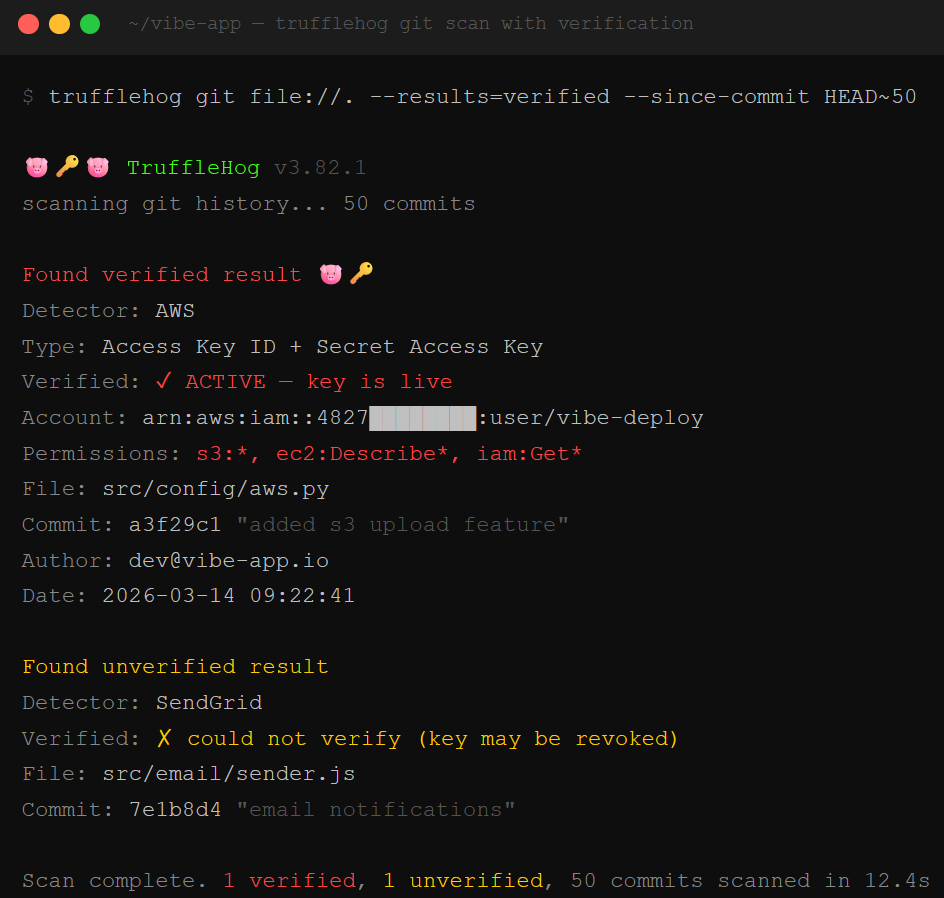
The combo is the standard play in 2026. Gitleaks pre-commit for speed, TruffleHog in CI/CD for depth. Secrets that slipped through before scanning was set up get verified and prioritized for rotation.
One more thing. If you’re using environment variables to store secrets (and you should be), make sure your .env file is in your .gitignore. This sounds obvious, but the AI will happily create a .env file, populate it with your API keys, and never add it to .gitignore. That one line in your gitignore is worth more than a hundred best practices documents. And if you already have secrets in your git history from before you set up scanning, TruffleHog’s --since-commit flag lets you audit everything in one pass and build a rotation list.
What Is Slopsquatting and How Does It Target Vibe Coders?
Here’s a scenario every vibe coder should understand. You ask your AI coding assistant to build a FastAPI backend with MongoDB integration. The AI generates a requirements.txt that includes fastapi-mongodb-helper. Sounds right. You run pip install. The package exists on PyPI. It installs cleanly.
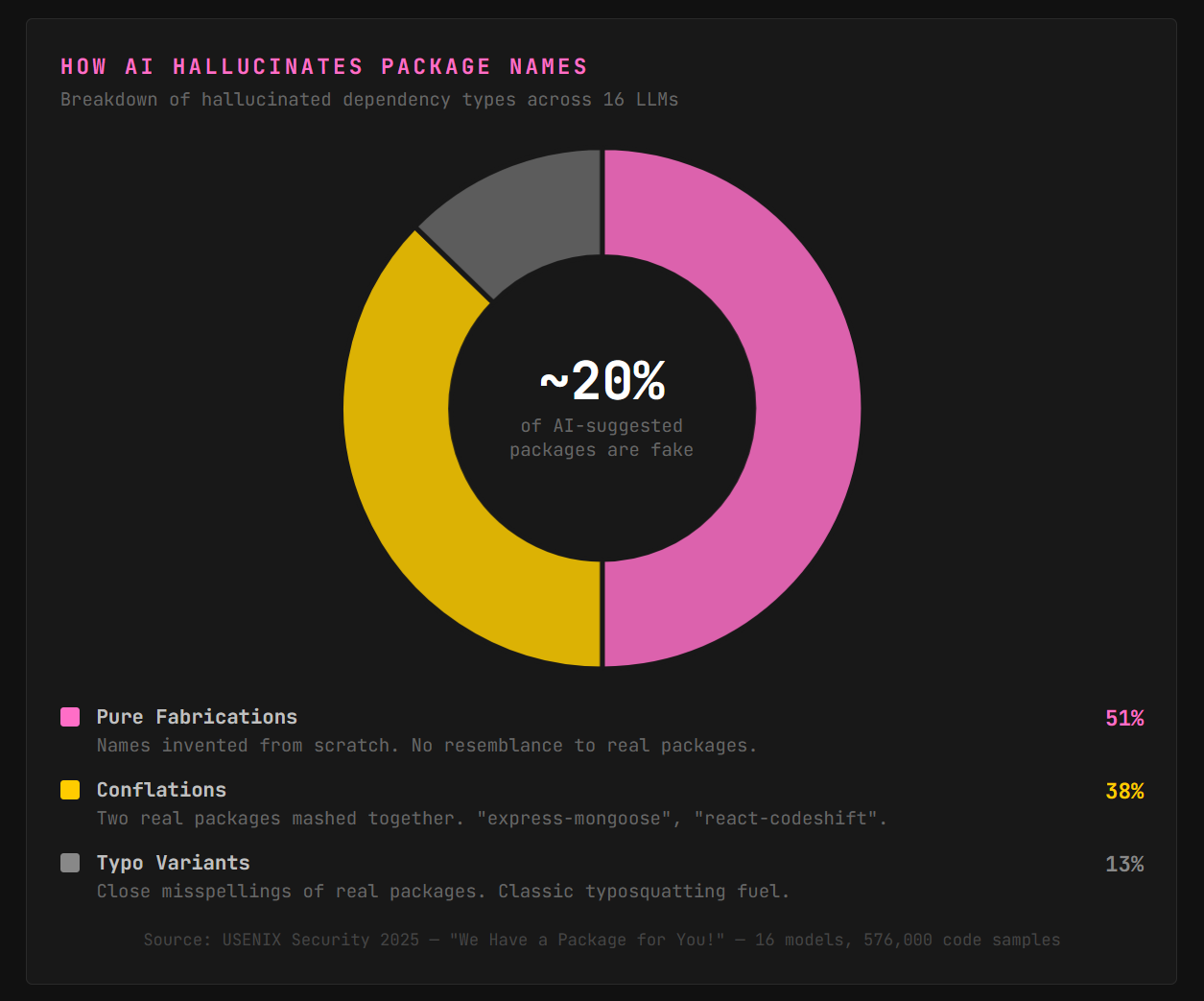
The problem: fastapi-mongodb-helper was never a real package. The AI hallucinated the name, mashing together real concepts into a plausible-sounding dependency that didn’t exist, until an attacker registered it. That’s slopsquatting, a supply chain attack where adversaries pre-register the package names that AI coding tools consistently hallucinate.
The hallucinations aren’t random. Ask the same model the same question ten times and a huge chunk of the fabricated package names repeat every single run. Predictable means weaponizable.
This is already happening in the wild. An npm package called react-codeshift appeared in early 2026, a name no human created. It was a hallucination mashup of two real packages (jscodeshift and react-codemod) that propagated to 237 repositories through forks, got translated into Japanese, and was still receiving daily download attempts from AI agents. Nobody planted it deliberately. The attack surface grew on its own.
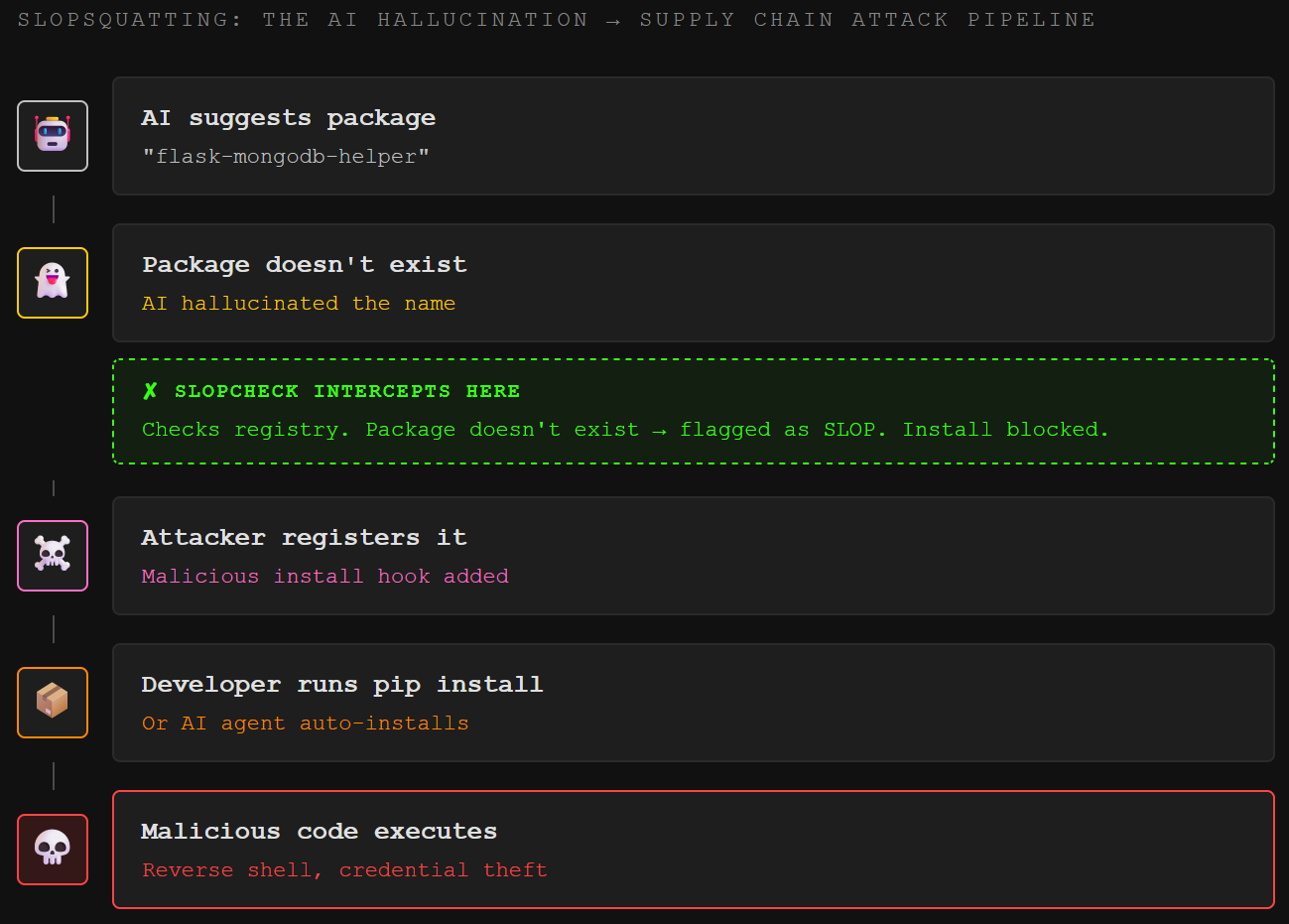
The fix has three layers.
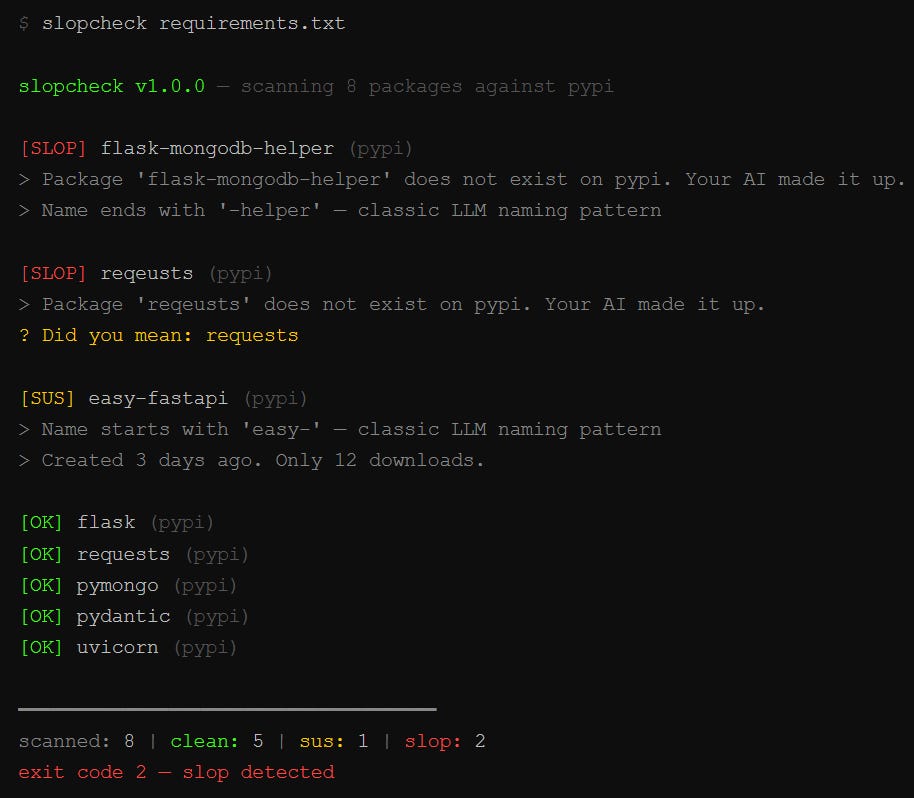
Catch hallucinated packages before they install. slopcheck is a free, open-source CLI built specifically for this problem. Point it at your project directory and it scans every dependency file (requirements.txt, package.json, Cargo.toml, go.mod, Gemfile, pom.xml) against live registries. If a package doesn’t exist, slopcheck flags it as slop. If it exists but was created in the last seven days, has under 100 downloads, or matches hallucination naming patterns like {popular-lib}-helper or {popular-lib}-utils, it flags it as suspicious.
The best part: slopcheck install wraps your real package manager. Instead of pip install flask requests sketchy-package, run slopcheck install flask requests sketchy-package. Clean packages install normally. Slop gets blocked. Always. Run slopcheck init to set up a pre-commit hook and hallucinated packages never enter your repo. One command, and the most dangerous class of AI supply chain attacks dies before pip ever fires.
Monitor for deeper supply chain threats. Socket provides a free browser extension and CLI tool that goes beyond existence checks. It performs deep package inspection, monitoring for 70+ signals of supply chain risk including obfuscated code, suspicious network activity, and install scripts that fire on import. Alias it to your package manager (alias npm="socket npm") and every install gets behavioral analysis alongside the registry check. Where slopcheck catches packages that shouldn’t exist, Socket catches packages that exist but shouldn’t be trusted.
Lock and audit. Use package-lock.json for npm or poetry.lock for Python. Lockfiles pin exact versions and prevent silent package substitution. Commit them. Every time. Run npm audit and pip audit regularly to catch known-vulnerable real packages that the AI pulled in without checking the CVE list.
The mindset shift: treat every AI-suggested dependency like a package from an untrusted stranger, because that’s exactly what it might be. The AI has no concept of package provenance. It doesn’t know who published a library, when it was last updated, or whether it phones home to a command-and-control server. Cross-ecosystem hallucinations make this worse: the AI knows a Python concept exists, invents a package name for it, and that name turns out to be a real, unrelated JavaScript package. Wrong ecosystem, wrong code, potential backdoor.
What Insecure Code Patterns Does AI Generate Most Often?
The third pitfall is the broadest: the actual code the AI writes contains security vulnerabilities. It learned from millions of public repositories where insecure patterns are the norm, and it reproduces them faithfully.
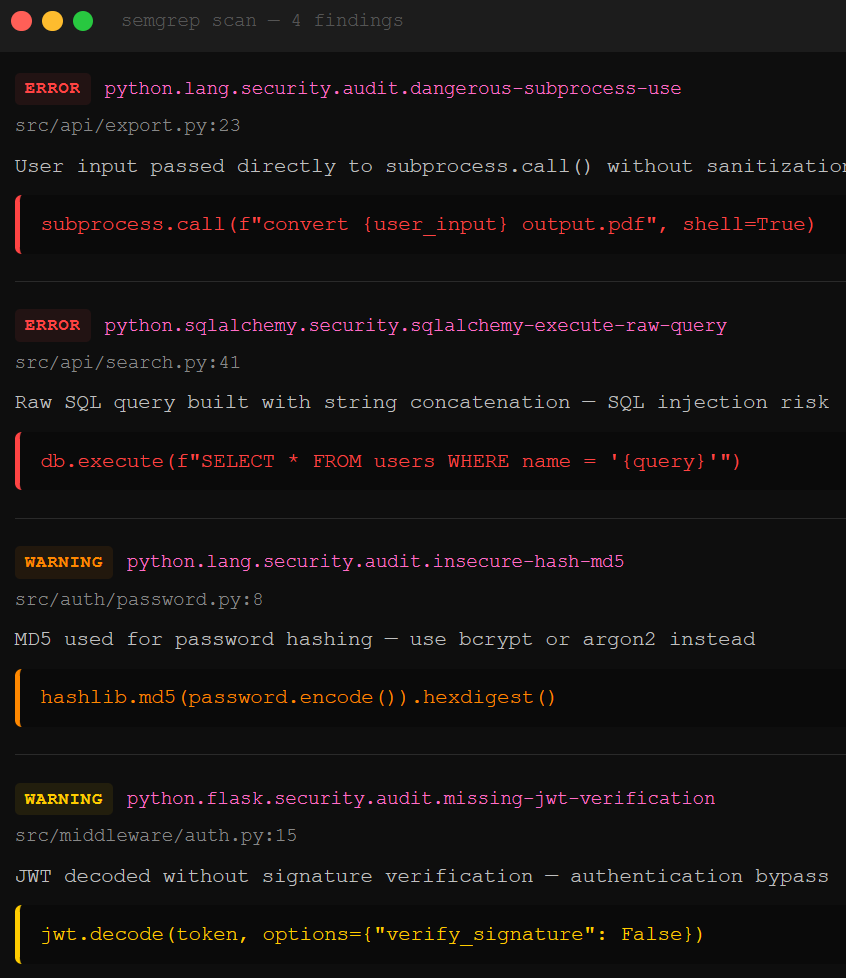
Missing input sanitization is the most frequent offender. The AI generates a form handler or API endpoint that takes user input and passes it directly to a database query, a shell command, or an HTML template without cleaning it first. That’s how you get SQL injection (SQLi, where an attacker sends database commands through a form field), cross-site scripting (XSS, where malicious JavaScript gets injected into pages other users see), and command injection (where user input gets executed as a system command). The AI doesn’t sanitize because the code it learned from didn’t sanitize.
Broken authentication and session handling ship just as quietly. When you ask the AI to scaffold a user management dashboard, it builds the feature: CRUD operations, role assignment, user creation. What it doesn’t build is the middleware that checks whether the person making the request is actually authorized. Auth middleware, the gate in front of the feature, gets skipped because the AI has no context for how your app verifies identity. That’s broken access control, OWASP’s number one web application security risk.
Insecure deserialization, weak crypto defaults, and error messages that leak internals round out the hit list. AI models default to whatever the training data used most often, which frequently means MD5 instead of bcrypt for password hashing (MD5 was broken years ago), pickle.loads() on untrusted data in Python (which executes arbitrary code), and detailed stack traces returned to end users (which tell attackers exactly what framework, database, and file paths your app uses).
Logic flaws are the sneakiest category. These are bugs that don’t show up in a static scan because the code is syntactically correct. They only appear under specific inputs or load conditions: a race condition in a payment flow that lets someone pay for a $100 item and get charged $0, or an authorization check that works for direct API calls but not for the same action triggered through a webhook. Enrichlead learned this the hard way: an AI built their entire lead-generation platform in Cursor, putting all security logic on the client side. Within 72 hours of launch, users changed a single value in the browser console to bypass payment entirely. 15,000 lines of AI-generated code, no way to audit it, project dead. These take human review or dynamic testing to catch, which brings us to the tooling that actually scales.
How Do Security Rules Files and Semgrep Prevent Insecure AI Code?
The tooling answer to insecure code patterns comes in two parts: telling the AI what not to generate, and scanning what it generates anyway.
Security rules files are the first line of defense. If you’re using Cursor, you already have access to the .cursor/rules/ system (or the legacy .cursorrules file). These are instruction files that the AI reads before generating any code. They persist across every prompt, every session. A security rules file tells the AI: always use parameterized queries for SQL, never hardcode credentials, always validate and sanitize user input, never use eval(), require authentication middleware on every route.
Open-source security rule collections already exist on GitHub (check matank001/cursor-security-rules and PatrickJS/awesome-cursorrules), and the Cloud Security Alliance has a full framework for writing security-focused Cursor rules. The setup is copy-paste: drop the rules file into your .cursor/rules/ directory, and every code generation request passes through your security guardrails first.
One critical caveat: security rules files are only as trustworthy as their source. Researchers have demonstrated that malicious actors can inject hidden Unicode characters or backdoor instructions into rule files that cause the AI to generate vulnerable code without the developer noticing. Treat your rules files like production code. Review them, version-control them, and never copy rules from untrusted sources without reading every line.
Semgrep is the second line. It’s an open-source static analysis tool with 5,000+ security rules that scans code for known vulnerability patterns. What makes it powerful for vibe coding in 2026 is the MCP (Model Context Protocol) integration: you can wire Semgrep directly into Cursor, Windsurf, VS Code, or any MCP-compatible IDE so that every chunk of code the AI generates gets scanned before you accept it. The AI writes code, Semgrep flags vulnerabilities, the AI fixes them, and Semgrep verifies the fix. The loop runs inside your editor. You never leave the flow.
Semgrep also recently shipped Cursor Hooks, which fire a scan automatically when the agent completes its loop. No developer opt-in required. The agent generates, Semgrep validates, and unsafe code gets rejected before it touches your codebase. For teams, the Cloud Distribution feature pushes preconfigured hooks to every developer machine. Security becomes deterministic instead of optional.
Rules files reduce the probability of insecure code being generated. Semgrep catches what slips through. Both are free.
For the solo vibe coder who wants maximum coverage with minimum friction, the stack looks like this: drop a security rules file into .cursor/rules/, install the Semgrep MCP server with pipx install semgrep-mcp, and add the instruction “Always scan code generated using Semgrep for security vulnerabilities” to your rules. Now every code generation request gets security guardrails on the way in and a vulnerability scan on the way out. It won’t catch everything. Logic flaws and context-dependent vulnerabilities still need human eyes. But the commodity-level bugs, the SQLi, the XSS, the hardcoded secrets that Semgrep’s 5,000+ rules cover, those stop shipping silently.
Paid unlocks the unfiltered version: complete archive, private Q&As, and early drops.
Frequently Asked Questions
Is vibe coding safe for production applications?
Vibe coding can produce production-ready code, but not by default. AI coding tools optimize for working software, not secure software, which means authentication gaps, hardcoded secrets, and unvalidated inputs ship unless you add explicit checks. The three tool layers covered here, secret scanning with Gitleaks and TruffleHog, supply chain verification with Socket, and static analysis with Semgrep, close the most common gaps without slowing development.
What is slopsquatting and how does it affect AI-generated code?
Slopsquatting is a supply chain attack where adversaries register package names that AI coding tools consistently hallucinate. LLMs fabricate plausible-sounding dependency names at a high rate, and many of those hallucinated names repeat predictably across prompts, making them easy targets for attackers. They register the hallucinated name on PyPI or npm, load it with malicious code, and wait for developers or AI agents to install it. Tools like slopcheck catch hallucinated packages before install by checking them against live registries, and Socket adds deeper behavioral analysis for packages that exist but act suspicious.
How do Cursor security rules files improve AI-generated code security?
Security rules files are instruction sets stored in your project’s .cursor/rules/ directory that the AI reads before generating code. They enforce standards like parameterized SQL queries, input sanitization, authentication middleware requirements, and bans on unsafe functions like eval(). The rules persist across every prompt, so you set them once and they apply to all generated code. Open-source rule collections are available on GitHub, and the Cloud Security Alliance has published a framework for writing security-focused rules.
Can Semgrep scan code while the AI is generating it?
Yes. Semgrep’s MCP server integrates directly into Cursor, VS Code, Windsurf, and other MCP-compatible editors. When the AI generates code, the IDE can call Semgrep to scan for vulnerabilities in real time. Semgrep’s Cursor Hooks feature automates this further: a scan fires automatically when the AI agent completes its loop, and the agent is prompted to fix any findings before the code is accepted. This makes security scanning deterministic rather than dependent on developers remembering to run it.
What are the most common security vulnerabilities in AI-generated code?
The most common are missing input validation leading to SQL injection, XSS, and command injection. Broken authentication and access control rank second, where the AI builds features but skips the identity checks that should gate them. Insecure defaults round out the list: weak hashing algorithms like MD5 for passwords, unsafe deserialization using Python’s pickle on untrusted data, and verbose error messages that expose internal paths and framework details to attackers.
ToxSec is run by a USMC veteran and Security Engineer with hands-on experience at AWS and the NSA. CISSP certified, M.S. in Cybersecurity Engineering. He covers security vulnerabilities, attack chains, and the tools defenders actually need to understand.
AMA! This is the last post for now in the vibe coding series. Rolling it all together! How to stay secure when vibe coding.
This is so helpful. Thank you!