


TL;DR: AI coding tools hardcode credentials because that’s what “working code” looked like in their training data. Every model has its own favorite placeholder secrets, and they ship to production if nobody checks. Gitleaks catches them at commit time. TruffleHog verifies which ones are still live. Both are free. Set them up in ten minutes.
This is the public feed. Upgrade to see what doesn’t make it out.
How Do Hardcoded Secrets End Up in AI-Generated Code?
You describe a feature. The AI writes it. Somewhere in that output is a database password sitting in plaintext, an API key dropped directly into a config file, or a JWT signing secret that every app the model has ever generated shares. The code runs. The feature works. The secret is now in your repo, your git history, and possibly your client-side JavaScript bundle where anyone with a browser can read it.
This is CWE-798: use of hardcoded credentials, one of the oldest entries in the weakness catalog. AI didn’t invent this problem. AI industrialized it. LLMs learned to code from millions of public repositories where developers hardcoded secrets constantly. The model reproduces the pattern because the pattern is what “working code” looked like in training. When you ask it to connect to Stripe or spin up a Postgres pool, the fastest path to functional output is dropping the credential inline. The model optimizes for code that runs, and hardcoded secrets run on the first try. This is one leg of a three-part attack surface that includes supply chain poisoning and prompt injection, all shipping in the same afternoon.
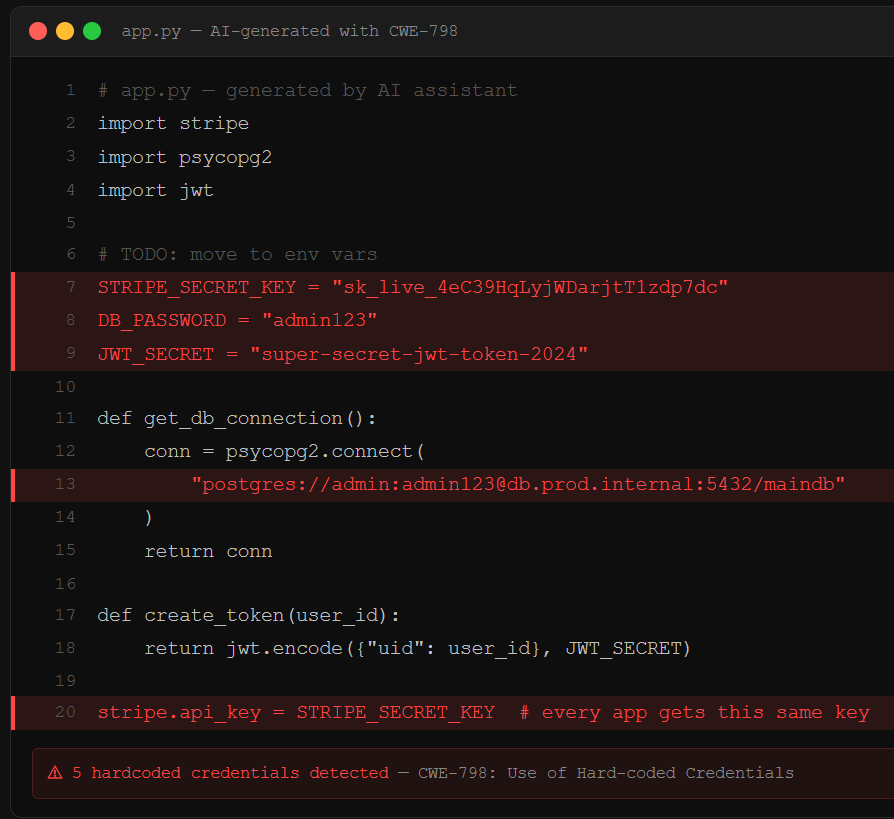
Here’s the part that makes this worse than a human mistake: researchers at Invicti found that each LLM has its own set of common secrets it reuses across different generated apps. The same JWT signing secrets, the same placeholder passwords like password123 and admin123, appearing in app after app. Those aren’t random. They’re fingerprints. An attacker who knows which model built your app can try the model’s favorite defaults before brute-forcing anything. Moltbook, an AI-built social network, shipped its entire credential store to the browser. No exploit required. Open DevTools, read the keys.
What Should You Actually Grep For?
The secrets AI drops into your code follow patterns. Knowing the patterns turns a vague “check for secrets” into a concrete five-minute audit.
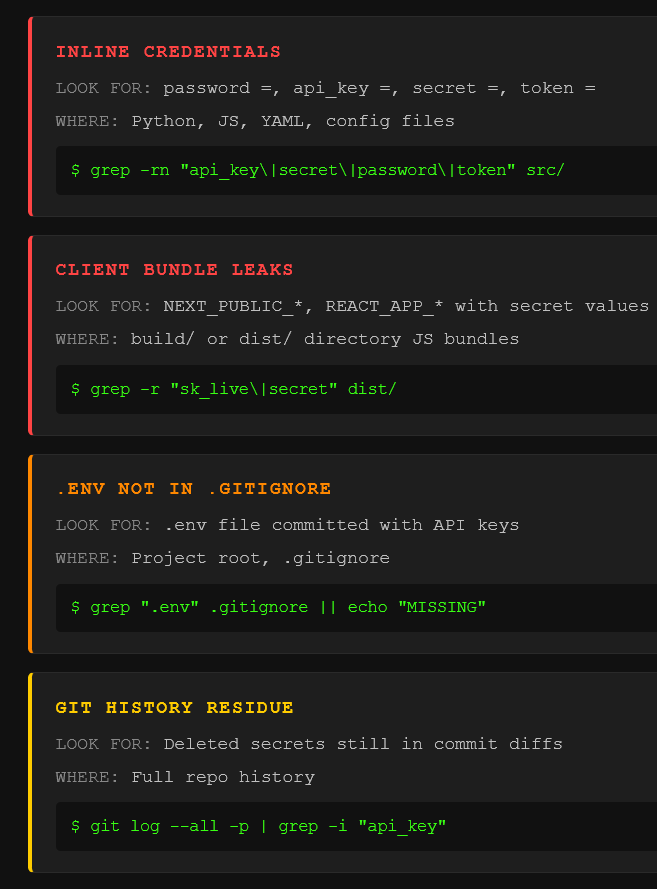
Inline credentials in source files. Strings like password =, api_key =, secret =, token = sitting in Python, JavaScript, or config files. The AI writes them as variable assignments, sometimes with a helpful # TODO: move to env vars comment that never gets acted on. Connection strings are the worst offender: postgres://user:password@host:5432/db contains the full credential in a single copy-pasteable line.
Client-side bundle leaks. Frontend frameworks bundle environment variables into JavaScript at build time. If the AI sets NEXT_PUBLIC_SUPABASE_KEY or REACT_APP_STRIPE_SECRET in a .env file, those values compile directly into the JS bundle that ships to every user’s browser. Grep your build/ or dist/ directory for key patterns. If they’re there, they’re public.
The .env file that never made it to .gitignore. The AI creates .env, populates it with your API keys, and never adds it to .gitignore. That one missing line is the difference between secrets stored locally and secrets committed to version control. Check it now: grep -r '.env' .gitignore. If nothing comes back, fix it before your next commit.
Git history. Deleting a secret from your current code does not delete it from your repo. Every commit is permanent.
git log --all -p | grep -i 'api_key\|secret\|password\|token' against your repo will show you everything that was ever committed. If secrets were there and got “removed,” they’re still there. And if you’re connecting AI agents via MCP, those tool descriptions can be poisoned to exfiltrate whatever credentials the agent can see.
How Do Gitleaks and TruffleHog Catch Leaked Secrets?
Two tools, both free, both open source. They solve different halves of the same problem.
Gitleaks is a pre-commit hook, a check that fires automatically before your code enters the repo. It scans staged changes against 160+ credential patterns (AWS keys, Slack tokens, database strings, the works) and blocks the commit if it finds a match. Install takes one command. Add a .pre-commit-config.yaml with the Gitleaks hook, run pre-commit install, and secrets stop entering your repo entirely. It runs in milliseconds. You won’t notice it until it saves you.
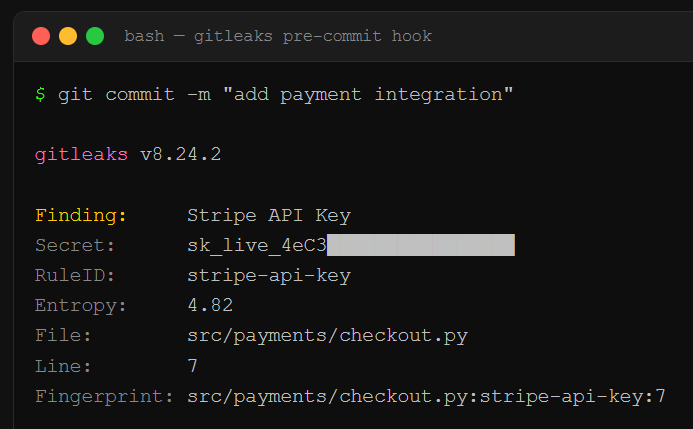
TruffleHog goes deeper. Where Gitleaks guards the gate, TruffleHog scans your entire git history, plus S3 buckets, Docker images, Slack workspaces, and CI/CD logs. It classifies 800+ credential types. Its differentiator is credential verification: when it finds something that looks like an AWS key, it actually authenticates against the AWS API to confirm the key is live. You don’t get a list of maybes. You get a prioritized list of confirmed active credentials sorted by blast radius. Run it in CI/CD alongside Gitleaks and you’ve got prevention at the gate plus depth scanning behind it.
The standard play: Gitleaks pre-commit for speed, TruffleHog in CI/CD for depth. Secrets that predate your scanning setup get caught, verified, and queued for rotation. For the full compound attack chain that starts with these leaked credentials and ends with full app compromise, the pillar piece walks the whole op. And if you’re running AI agents with access to your codebase, the OpenClaw teardown shows how exposed API keys in agent configs create the same initial access vector at machine scale. The Molt Road investigation goes further: stolen agent credentials are already being traded in automated black markets.
Paid unlocks the unfiltered version: complete archive, private Q&As, and early drops.
Frequently Asked Questions
Does deleting a secret from my code remove it from git history?
No. Git stores every version of every file permanently. Removing a secret in a new commit means the current branch no longer shows it, but git log -p still exposes it in the diff where it was first introduced. Anyone who clones your repo has the full history. To actually purge a secret, you need tools like git-filter-repo to rewrite history, then force-push. Easier to rotate the credential and treat the old one as compromised.
Can I just use environment variables instead of hardcoding secrets?
Environment variables are the right call, but they’re only half the fix. The AI will create a .env file and populate it with your keys, then never add .env to .gitignore. If that file gets committed, your “environment variable” approach just moved the secret from the source file to a different file in the same repo. Always verify .env is in .gitignore. For production, use a secrets manager (AWS Secrets Manager, HashiCorp Vault, Doppler) so credentials never exist in files at all.
How often do AI coding tools actually hardcode credentials?
Frequently enough to be the single most common security finding in vibe-coded apps. Invicti’s analysis of vibe-coded web applications found hardcoded secrets in a significant portion of generated apps, with each LLM model reusing its own set of favorite placeholder credentials across different projects. GitGuardian’s reporting found that repositories using AI coding tools showed a measurably higher rate of secret exposure than those without.
ToxSec is run by a USMC veteran and Security Engineer with hands-on experience at AWS and the NSA. CISSP certified, M.S. in Cybersecurity Engineering. He covers security vulnerabilities, attack chains, and the tools defenders actually need to understand.
One of a set of 3 aimed at vibe coding pitfalls!
I think everyone should feel empowered by all these new AI tools, and start building the things you've always wanted to!
Just make sure you know what to look for.
Action-Solution based. Avoid these and push to prod!
Great recs. Also, there is now “betterleaks” which is helpful.